Template:Sub1/Sub2 Level Control: Difference between revisions
Jump to navigation
Jump to search
mNo edit summary |
mNo edit summary |
||
| (16 intermediate revisions by the same user not shown) | |||
| Line 1: | Line 1: | ||
;Question: Why have a LEVEL control on the Bose Sub1/Sub2? | {{Sub icon}} | ||
[[File:Sub1 Sub2 Level Control.jpg|100px|right]] | |||
;Question: Why have a LEVEL control on the Bose Sub1/Sub2? This can also apply to other subwoofers as well. | |||
;Answer: [[File:Equal Loudness.jpg|link=https://en.wikipedia.org/wiki/Equal-loudness_contour|thumb|300px|right|alt=Equal-loudness contours from ISO 226:2003 shown with original ISO standard.]] | ;Answer: [[File:Equal Loudness.jpg|link=https://en.wikipedia.org/wiki/Equal-loudness_contour|thumb|300px|right|alt=Equal-loudness contours from ISO 226:2003 shown with original ISO standard.]] | ||
'''At lower volume''', the [https://en.wikipedia.org/wiki/Equal-loudness_contour Equal Loudness contour]<ref>[https://en.wikipedia.org/wiki/Equal-loudness_contour Equal Loudness contour]</ref> shows that humans don't perceive bass as well as mid-highs. You can compensate for this by turning up the Sub1/Sub2 LEVEL Control. | |||
Other times bass may seem excessive | |||
* At higher volumes | |||
* Due to boundary effects (proximity to walls and corners) | |||
* On a resonant stage | |||
Recommended Settings | You can compensate for this by turning down the Sub1/Sub2 LEVEL Control. | ||
#Set the Sub1/Sub2 Level control at 12:00 o'clock. | |||
Recommended Settings[[File:Sub1Sub2 Level Control.jpg|300px|right]] | |||
#Set the Sub1/Sub2 Level control at 12:00 o'clock<ref>[[Media:Sub1-Sub2 Owners Guide.pdf|Bose Sub1 & Sub2 Powered Bass Modules Owners Guide]]</ref>. | |||
#Raise/lower the volume of the L1 Pro32 as required. | #Raise/lower the volume of the L1 Pro32 as required. | ||
#Adjust the Sub1/Sub2 Level control to balance bass level with the mid-high level from the L1 Pro 32. | #Adjust the Sub1/Sub2 Level control to balance bass level with the mid-high level from the L1 Pro 32. | ||
[https://twitter.com/ST_Muso/status/1388037172658249735 Comments] | |||
<!-- | <!-- | ||
[[File:Lindos1.svg|thumb|400px|right|alt=Equal-loudness contours from ISO 226:2003 shown with original ISO standard.|''[[International Organization for Standardization|ISO]] equal-loudness contours with frequency in Hz.'']] --> | [[File:Lindos1.svg|thumb|400px|right|alt=Equal-loudness contours from ISO 226:2003 shown with original ISO standard.|''[[International Organization for Standardization|ISO]] equal-loudness contours with frequency in Hz.'']] --> | ||
| Line 18: | Line 31: | ||
[[Category:L1 Pro]] | [[Category:L1 Pro]] | ||
[[Category:Equal Loudness]] | [[Category:Equal Loudness]] | ||
[[Category:Sub]] | |||
Latest revision as of 01:08, 20 May 2021

- Question
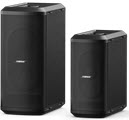
- Why have a LEVEL control on the Bose Sub1/Sub2? This can also apply to other subwoofers as well.
- Answer
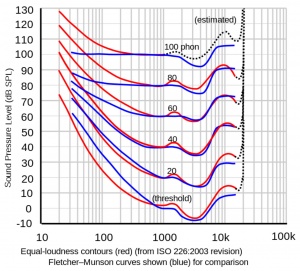
At lower volume, the Equal Loudness contour[1] shows that humans don't perceive bass as well as mid-highs. You can compensate for this by turning up the Sub1/Sub2 LEVEL Control.
Other times bass may seem excessive
- At higher volumes
- Due to boundary effects (proximity to walls and corners)
- On a resonant stage
You can compensate for this by turning down the Sub1/Sub2 LEVEL Control.
Recommended Settings

- Set the Sub1/Sub2 Level control at 12:00 o'clock[2].
- Raise/lower the volume of the L1 Pro32 as required.
- Adjust the Sub1/Sub2 Level control to balance bass level with the mid-high level from the L1 Pro 32.