Template:Sub1/Sub2 Level Control: Difference between revisions
Jump to navigation
Jump to search
mNo edit summary |
mNo edit summary |
||
| Line 6: | Line 6: | ||
:At lower volume, the [https://en.wikipedia.org/wiki/Equal-loudness_contour Equal Loudness contour]<ref>[https://en.wikipedia.org/wiki/Equal-loudness_contour Equal Loudness contour]</ref> shows that humans don't perceive bass as well as mid-highs. You can compensate for this by turning up the Sub1/Sub2 LEVEL Control. | :At lower volume, the [https://en.wikipedia.org/wiki/Equal-loudness_contour Equal Loudness contour]<ref>[https://en.wikipedia.org/wiki/Equal-loudness_contour Equal Loudness contour]</ref> shows that humans don't perceive bass as well as mid-highs. You can compensate for this by turning up the Sub1/Sub2 LEVEL Control. | ||
:At higher volume, the bass may seem excessive. You can compensate for this by turning | :At higher volume, the bass may seem excessive. You can compensate for this by turning down the Sub1/Sub2 LEVEL Control. | ||
Revision as of 07:53, 30 April 2021

- Question
- Why have a LEVEL control on the Bose Sub1/Sub2? This can also apply to other subwoofers as well.
- Answer
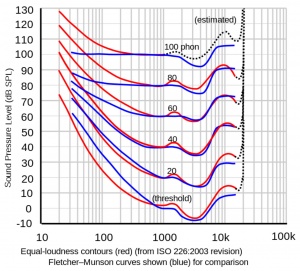
- At lower volume, the Equal Loudness contour[1] shows that humans don't perceive bass as well as mid-highs. You can compensate for this by turning up the Sub1/Sub2 LEVEL Control.
- At higher volume, the bass may seem excessive. You can compensate for this by turning down the Sub1/Sub2 LEVEL Control.
Recommended Settings

- Set the Sub1/Sub2 Level control at 12:00 o'clock.
- Raise/lower the volume of the L1 Pro32 as required.
- Adjust the Sub1/Sub2 Level control to balance bass level with the mid-high level from the L1 Pro 32.