You can use the S1 Pro+ as the sound source (e.g., microphone and guitar and backing tracks via Bluetooth). Engage the S1 Pro+ Sub EQ and use the S1 Pro+ Line Out to send a full range signal to the Sub1/Sub2.
👉 Turn on the Sub EQ (see the excerpt from the manual below)
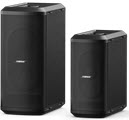
Note these settings on the Sub1 or Sub2
👉 Set LINE IN EQ to L1
👉 Set LINE OUT EQ to S1 (Press and hold LINE OUT EQ button for 4 seconds)
Note the following:
On the S1 Pro+ turn on the Sub EQ setting. This sets the internal high pass filter to approximately 150 Hz.
The Sub EQ setting does not affect the S1 Pro+ Line Out. The Line Out remains full-range
With the Sub EQ turned on, the S1 Pro+ will produce frequencies above 150 Hz and you will be able to push S1 Pro+ harder (louder) without low-end distortion
Without the Sub EQ turned on, the S1 Pro+ will sound the same as without the subwoofer
The Sub1 or Sub2 will cover from 40 Hz (Sub1) 37 Hz (Sub2) to 150 Hz