Difference between revisions of "Template:Feedback FAQ"
m |
m |
||
| Line 52: | Line 52: | ||
For examples and diagrams, see [[Feedback / Microphone#Directional Microphones]]. | For examples and diagrams, see [[Feedback / Microphone#Directional Microphones]]. | ||
}} | }} | ||
| − | |||
{{FAQItem | {{FAQItem | ||
|question = How should I place monitors to avoid feedback? | |question = How should I place monitors to avoid feedback? | ||
|answer = | |answer = | ||
| − | + | {{Monitor Placement}} | |
| − | |||
| − | |||
| − | |||
}} | }} | ||
| − | |||
{{FAQItem | {{FAQItem | ||
|question = How many open microphones can I use before feedback becomes a problem? | |question = How many open microphones can I use before feedback becomes a problem? | ||
Latest revision as of 21:47, 23 February 2026
| Collapse all
What causes microphone feedback?
Feedback happens when the sound from the loudspeaker is louder at the microphone than the sound of the voice. If the microphone “hears” more speaker than performer, the system will feed back.
For a full explanation and diagrams, see Feedback / Microphone.
How do I set gain staging to reduce feedback?
Set your source at its loudest performance level, then raise the Trim until you get solid green with occasional yellow (never red). Once Trim is set, use channel volume for mixing — not Trim.
Details for the T4S/T8S
The first thing you do when connecting a sound source to your ToneMatch mixer is set the input trim. This is gain staging. Then you can set the ToneMatch Preset for your source. We'll do both in the short video below.
At the beginning of the video, I'm doing a factory reset so we don't bump into any old settings. You do not have to do a factory reset before you set the input trim on your ToneMatch mixer.
- The trim controls across the top will be different
- The trim controls across the top of your ToneMatch mixer will likely be different. This is because the output levels of your input sources will likely be different. This is normal.
- Mixing - Use the volume controls not the trim controls
- Once you have set the input trim, you should not have to change it until you change the input source (e.g. different microphone, singer, or instrument). Do not use the trim control to change the channel volume. Use the channel volume control.
- Scenes
- Saved Scenes do not capture the trim, channel volume, or Master Volume settings.
Set Up Your Source
Set your source at the maximum that it will be when performing.
- Microphone
- Sing directly into the microphone using close microphone technique (lips just brushing the windscreen). Sing as loudly as you will sing during your performance. You want to set the Trim to work at your maximum volume.
- Instrument
- Turn your input as high as it is likely to go during performance.
Trim Controls
The ToneMatch Mixer[1] trim controls for Channels 1-4 (1-8 for the T8S ToneMatch mixer) provide a significant gain increase when you reach the upper limit. This increase in gain is normal operation.
Most sources like typical microphones and piezo pickup systems can provide enough level without the need to add significant gain from the trim control. Certain sources like passive acoustic guitar pickups require additional gain and in these cases it can be necessary to set the trim level to the upper range of the control. When the trim control is set this high you may notice the gain change. This is normal operation. If you want to run the trim control at lower settings we recommend using a preamp or simple stomp box level booster.
The trim for Aux input channels 5/6 (9/10 for the T8S ToneMatch mixer) do not exhibit the same behavior as the trim controls for Channels 1-4 (1-8 for the T8S ToneMatch mixer). The Aux inputs are designed for line level sources and do not have the same gain staging as channels 5/6 (9/10 for the T8S ToneMatch mixer).
Details for the T1
Here's a quick video to help you set the input trim for a microphone on the T1 ToneMatch Audio Engine. This is called Gain Staging.
- The trim controls across the top will be different
- The trim controls across the top of your T1 ToneMatch Audio Engine will likely be different. This is because the output levels of your input sources will likely be different. This is normal.
- Mixing - Use the volume controls not the trim controls
- Once you have set the input trim, you should not have to change it until you change the input source (e.g. different microphone, singer, or instrument). Do not use the trim control to change the channel volume. Use the channel volume control.
- Scenes
- Saved Scenes do not capture the trim, channel volume, or Master Volume settings.
The same principles apply to an instrument or line-level input.
- Set the source to the highest level you will need during the show
- Set the input trim so that you get solid green, occasional yellow flickers, and never see red.
For more detailed steps for T1, T4S, and T8S, see Feedback / Microphone#Gain Staging.
Microphone Technique?
Use close‑microphone technique: lips touching the windscreen. Every halving of distance gives roughly 6 dB more gain before feedback.
Close Microphone Technique details
Get close to the microphone when you want to be loud. No other technique has a big an impact on feedback. Each halving of distance is approximately another 6 dB of gain before feedback. This relationship in physics is known as the Inverse Square Law. This means that the difference between working a microphone at 2 inches, and 1/4 inch is 18 dB, which is more than twice as loud. While good mic technique often involves "working" the microphone at different distances, singers must be mindful of the fact that small changes in distance from the mouth result in very dramatic changes in sound level.
In the feedback diagram at the top, getting close to the microphone means getting more sound from voice which translates to more gain without feedback.
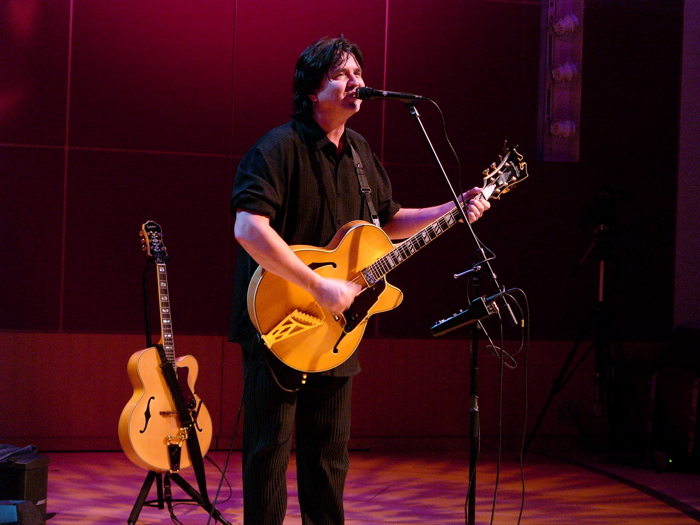
For more, see Feedback / Microphone#Close Microphone Technique.

Do directional microphones help with feedback?
Yes. Supercardioid and hypercardioid microphones provide the best gain‑before‑feedback, followed by cardioid. Omnidirectional microphones provide the least.
Details about Directional Microphones
Principles
Use a directional microphone. Hypercardioid is better than cardioid, which is better than omnidirectional. All sound waves impinging on the microphone from a direction other than the intended signal is "noise" and will lower the threshold of feedback.
Directional microphones "collect" less sound from directions other than what they're supposed to amplify (the voice, or an instrument) and hence are less likely to feed back.
In addition, most directional microphones have a strong behavior called proximity effect. This is the strong buildup of bass and low-mid response as the source (say the voice) to microphone distance decreases. For microphones intended to sound natural when the voice is very close -- say one of a number of popular stage vocal microphones -- what this means is that low-to-middle frequencies from sources at a distance, including loudspeakers being used to amplify the voice, are largely rejected by the microphone. This is a real plus in terms of avoiding microphone feedback.
Conversely, an omnidirectional microphone (equal sensitivity to sound coming from any direction) has no proximity effect. This is an advantage often in the studio where the engineer wants consistent tone regardless of distance. But it's a disadvantage on stage in terms of feedback. An omnidirectional mic collects more sound that's not the target, and because it has no proximity effect is more susceptible to feedback at low-to-mid frequencies than a directional mic.
Omnidirectional and Unidirectional Microphones
There are two basic types of microphone — omnidirectional and unidirectional[2].
- Omnidirectional Microphone
Omnidirectional mic. It is sensitive to sounds from all directions.
- It's unlikely you will use an omnidirectional microphone in a live performance setting. You will pick up too much ambient noise from the room, the audience, and the loudspeakers (leading to feedback).
- Use omnidirectional microphones when the sound source could be anywhere around the microphone. This picks up a lot of room ambiance, which sometimes is the goal. Direct and ambient sound can be adjusted by moving the microphone closer to or further from the sound source.
- Unidirectional Microphone
Unidirectional microphones are sensitive to sound coming from only one direction. Examples:
- a vocalist singing directly on axis directly into the microphone
- a guitar amplifier with the microphone aimed directly at the speaker cone
All of the following types are unidirectional
- Cardioid
The most common type of unidirectional microphone is called a “cardioid” because its pickup pattern is heart-shaped. It picks up most sound from the front of the microphone and some from the sides.
Although you will get better gain-before-feedback from a cardioid microphone than an omnidirectional microphone, you will get better gain-before-feedback from a supercardioid or hypercardioid microphone (see next section).
Examples of common cardioid microphones (good to great microphones but not necessarily the best for gain-before-feedback with Bose L1 systems)
- Sennheiser e 835, e 935, MD 935
- Shure SM 58, SM 57, Beta 87C
- Supercardioid / Hypercardioid
Supercardioid or hypercardioid microphones offer even greater sound isolation through narrower pickup patterns.
Examples of common supercardioid/hypercardioid microphones
- Audix OM 5, OM 3b, OM 6, OM 7, VX 5
- EV N/D 767A
- Neumann KMS 105
- Sennheiser e 845, e 865, e 945, e 965, MD 441, MD 945,
- Shure Beta 58A, Beta 87A
For examples and diagrams, see Feedback / Microphone#Directional Microphones.


How should I place monitors to avoid feedback?
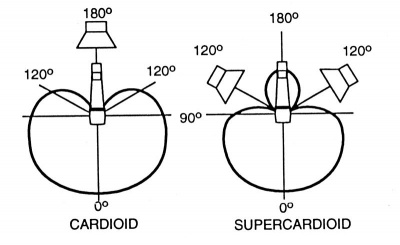
If you are using stage monitors, be sure to place them so they are directing sound at the area of the microphone that rejects the most sound.
Note from Shure.com
- Other variants on the unidirectional polar pattern include supercardioid and hypercardioid options. Both patterns offer narrower front pickup angles than the cardioid – 115 degrees for the supercardioid and 105 degrees for the hypercardioid – alongside greater rejection of ambient sound. Additionally, while the cardioid is least sensitive at the rear (180 degrees off-axis), the supercardioid is least sensitive at 125 degrees and the hypercardioid at 110 degrees. When placed properly they can provide more 'focused' pickup than the cardioid pattern, but they also have less rejection at the rear. If you're using either of these polar patterns on stage with wedge monitors, it's important make sure you avoid placing the wedges directly behind the mic in this instance. Instead, place them either side at the mics least sensitive angle.

How many open microphones can I use before feedback becomes a problem?
Every time you double the number of open microphones, you lose about 3 dB of gain before feedback. Use as few open mics as possible, and mute or gate unused ones.
How should I use EQ to reduce feedback?
Use EQ sparingly. Avoid excessive high‑frequency boost, and use ParaEQ to notch out a single problem frequency if needed.
For step‑by‑step notching instructions, see Feedback / Microphone#Notch Out a Problem Frequency.
Do vocal effects increase feedback?
Yes. Turn off effects until you have stable gain, then add them back one at a time so you can hear their impact.
Do instrument pickups help reduce feedback?
Yes. Pickups provide much higher gain‑before‑feedback than microphones and avoid the distance/position issues of miking an instrument.