Template:L1 Pro

Contents
The L1 Pro models share a common user interface and the L1 App. This page has links to resources for all three models and the Bose products that integrate with them.
You can jump straight to L1 Pro Frequently Asked Questions for L1 Pro users.
L1 Pro Family
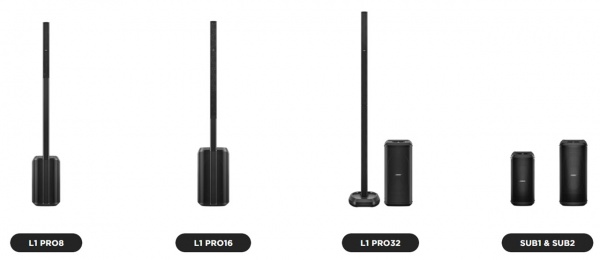
Bose Pro announced the Bose L1 Pro line on October 26, 2020.
Bose App to control L1 Pro and S1 Pro+


If you have an L1 Pro, check out the L1 Pro Frequently Asked Questions
If you have an L1 Pro, check out the L1 Pro Frequently Asked Questions
Documentation
L1 Pro8
L1 Pro16
L1 Pro32
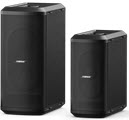
Sub1/Sub2
L1 Pro Technical Data Sheets
- L1 Pro8 Technical Data Sheet
- L1 Pro16 Technical Data Sheet
- L1 Pro32 Technical Data Sheet
- Sub1 Technical Data Sheet
- Sub2 Technical Data Sheet
L1 Pro Service Manuals
L1 Pro Self-Serve Support
Application Guide
L1 Pro Firmware
Resources
L1 Pro Family Selection Guide (product comparison)
Choosing the L1 Pro System That's Right for You (Youtube) / (Facebook livecast)
Bose L1 Pro Technical Training Videos
L1 Pro and the Mobile DJ - video L1 Pro Technical Certification Course (no charge, but you must register)
Articles
Should I get an L1 Pro8 or L1 Pro16?
Should I get an L1 Pro16 or L1 Pro32?
Do I Need to Upgrade from the L1 Compact to the L1 Pro8?
Do I Need to Upgrade from the L1 Model II to the L1 Pro32?
S1 Pro+ x 2 vs L1 Pro8 with T4S
Which L1 Pro for Singer/Songwriter/Electric Guitarist
T1 Compatibility With L1 Pro Systems
Mixer to L1 Pro Connect your third-party mixer to any L1 Pro
L1 Pro and SimpleSync Connect L1 Pro to Bose Smart Speaker Group
L1 Pro32 Separating the Sections of the Mid-High Array
Comparing Specifications
Comparing L1 Pro Models
Bose L1 Pro8 Compared to L1 Pro16
Bose L1 Pro16 Compared to L1 Pro32
Comparing L1 Pro Power Stands to Subs
Legacy to L1 Pro Models
Bose L1 Compact Compared to L1 Pro8
Bose L1 Model 1S Compared to L1 Pro16
Bose L1 Model II Compared to L1 Pro32
Quick Tips
L1 Pro Line Out
The XLR Line Output from any L1 Pro contains the sound from all inputs (1, 2, 3, Bluetooth, and ToneMatch Port). That includes
- ToneMatch Presets
- Tone Controls
- Reverb
- The signal from a ToneMatch mixer connected to the ToneMatch port including ToneMatch Presets, zEQ, Reverb, Effects.
The sound is NOT affected by the L1 Pro System EQ setting.
L1 Pro Daisy Chain
Want to connect one or more L1 Pro systems together? See L1 Pro Daisy Chain
L1 Pro System EQ
The System EQ feature on the L1 Pro systems applies an EQ preset to the master output. This is similar to a graphic equalizer on traditional analogue mixers, but it uses four presets instead for quick access. read more — L1 Pro System EQ
L1 Pro32 Half Stack
- Can I operate the L1 Pro32 with only the lower section of the line array?
- Sometimes there is not sufficient height to use the full array
- Yes
- The L1 Pro32 can be used without the upper array. This configuration is useful when a venue ceiling cannot accommodate the height of the L1 Pro32
Source: Page 7 of the L1 Pro32 Owners Guide
- For best results, ensure array is at ear level for listeners
- Unlike the L1 Model II, the L1 Pro32 automatically adjusts the level of the bass output to maintain the appropriate spectral balance.
- It’s a valid use case to use only the bottom array section. In fact, the EQ automatically adjusts to compensate.
Craig Small - Bose
- Half Stack Not Recommended for Small Gigs
Running only the lower section of the Line Array is a workaround when there isn't enough ceiling clearance to use both sections. For small gigs, turn down the volume on the L1 Pro32, don't run without the top section of the array because
- You'll need to elevate the system so the array is at ear level for the audience. Otherwise, the sound will be muffled
- You will reduce your projection over distance. The sound will drop off more over distance.
- You may need to turn up the volume louder than if you were using the full array. As a result, you increase the likelihood of feedback.
L1 Pro Emergency Kit

These are extras and spares I carry in addition to the items I know I will need at a gig.
| Item | Reason |
|---|---|
| IEC Power Cord | They got lost, and this can be used with an XLR cable to substitute for a SubMatch Cable |
| XLR cable | It's always good to have a spare. Use with an IEC Power Cord to replace a SubMatch Cable |
| 1/4-inch (6.3mm) Tip-Ring-Sleeve Cable | Connect mixers or devices with balanced connections to the L1 Pro. |
| 1/4-inch (6.3mm) Tip-Sleeve Cable | This is your basic instrument cable. It's always good to have a spare. |
| XLR Female to 1/4-inch (6.3mm) Tip-Ring-Sleeve Cable | To connect Line Level Output from an L1 Pro or third-party mixer to Channel 3 input of an L1 Pro or S1 Pro+ |
| 1/8-inch (3.5 mm) Tip-Ring-Sleeve Cable | Use this to connect the headphone output of a consumer device to L1 Pro or S1 Pro(+) channel 3 input |
| CAT5 cable | Connect ToneMatch Mixers (T1/T4S/T8S) to the L1 Pro ToneMatch Port |
| ToneMatch Power Supply | In case I need to run two ToneMatch Mixers to a single L1 Pro |
| Dynamic Microphone | This is a spare; the one to use when you have guest speakers making announcements |
| Microphone Clip | They break |
| Multi-bit Screwdriver | Tighten, loosen, everything as needed |
| Gaffers Tape | Tie down cables, or quick repairs |
| Labels with contact information | I have labels on all my gear, but it's good to have spares in case they fall off |
FAQ
General Questions
| Collapse all
What are the mid-high array and lower mid-high array made from? Metal mesh front and is rear metal or plastic?
Arrays on all units feature an extruded aluminum sleeve. Perforated grille on the front, solid on the back. Source: Craig Small
Are the column speaker arrays interchangeable between the different models? (L1 Pro8, L1 Pro16, L1 Pro32)
No. While the column arrays and extensions of the L1 Pro8 and L1 Pro16 will fit each other, no sound comes out.
Can I operate the L1 Pro32 with only the lower section of the line array? Sometimes there is not sufficient height to use the full array
Yes
- The L1 Pro32 can be used without the upper array. This configuration is useful when a venue ceiling cannot accommodate the height of the L1 Pro32
Source: Page 7 of the L1 Pro32 Owners Guide
- For best results, ensure the array is at ear level for listeners
- The L1 Pro32 automatically adjusts the level of the bass output to maintain the appropriate spectral balance.
- It’s a valid use case to use only the bottom array section. In fact, the EQ automatically adjusts to compensate.
Craig Small - Bose
- Half Stack Not Recommended for Small Gigs
Running only the lower section of the Line Array is a workaround when there isn't enough ceiling clearance to use both sections. For small gigs, turn down the volume on the L1 Pro32, don't run without the top section of the array because
- You'll need to elevate the system so the array is at ear level for the audience. Otherwise, the sound will be muffled
- You will reduce your projection over distance. The sound will drop off more over distance.
- You may need to turn up the volume louder than if you were using the full array. As a result, you increase the likelihood of feedback.
Inputs and Connections
| Collapse all
Is the Channel ToneMatch Setting (MIC/INST/OFF) like a MIC/LINE switch on other active loudspeakers? Does it change the input gain?
No. This is NOT like a MIC/LINE selector found on many other powered loudspeakers.
The Channel ToneMatch Setting (MIC/INST/OFF) affects only the ToneMatch Preset applied to the input. It does not affect input sensitivity or gain applied to the signal.
Channel ToneMatch Button: Select the ToneMatch preset for an individual channel. Use MIC for microphones and INST for acoustic guitar. The corresponding LED will illuminate white while selected.
More about ToneMatch Presets.
How do I connect a third-party mixer to the L1 Pro
If the mixer has XLR outputs
- Mixer mono out → XLR‑to‑Tip‑Ring‑Sleeve → L1 Pro Channel 3
If the mixer has 1/4-inch (6.3mm) Tip-Ring-Sleeve outputs
- Mixer mono out → 1/4-inch (6.3mm) Tip‑Ring‑Sleeve cable to → L1 Pro Channel 3
For more details, see Mixer to L1 Pro
Can I use XLR cables from my mixer into Channels 1 or 2?
You can, and it might work. Click for details
And yes, there are even pictures of this in the L1 Pro manuals.
However, using XLR to XLR connections can lead to problems.
1. Some mixers can output mic‑level on XLR — most cannot
If your mixer allows switching its XLR outputs from Line to Mic, then it may work. But this is uncommon. Using XLR → ¼″ (6.3 mm) Tip‑Ring‑Sleeve into Channel 3 is far more reliable.
2. Most mixer XLR outputs are line‑level, which is a poor match for the L1 Pro’s mic‑level XLR inputs
This mismatch can cause:
- Input clipping
- Harsh distortion
- Unpredictable behavior
3. You can sometimes “make it work,” but it’s not ideal
You might avoid clipping by:
- Turning down the mixer output
- Turning down the L1 Pro channel volume
However:
- Lowering the mixer output reduces signal‑to‑noise ratio (more hiss)
- Turning the L1 Pro channel knob very low gives almost no usable range
- Volume may jump from too quiet → too loud with tiny adjustments
4. Channel 3 avoids all of these issues
Channel 3 is designed for line‑level sources and provides:
- Proper level matching
- Lower input sensitivity (less likely to clip/distort)
- Full +24 dBu headroom
- Predictable behavior
- No ToneMatch presets
- No Reverb
- No DSP gain steps
This is why the recommended method is: Mixer mono out → XLR‑to‑Tip‑Ring‑Sleeve → L1 Pro Channel 3
Why are the 1/4-inch (6.3 mm) Tip-Ring-Sleeve Inputs on channels 1 and 2 louder than the 1/4-inch (6.3 mm) Tip-Ring-Sleeve Input on Channel 3
By design, the input sensitivity on channel 3 1/4-inch (6.3 mm) Tip-Ring-Sleeve is lower than on channels 1 and 2, so that when using line-level inputs, channel 3 is less likely to clip. You can get the same output from channel 3, but you may have to turn up the volume control higher to do it. You are most likely to notice this difference when connecting a third-party mixer to the L1 Pro. For more information see Mixer to L1 Pro
How do I connect one L1 Pro to another L1 Pro (Daisy chain)?
Use an XLR female to 1/4 inch (6.3 mm) Tip-Ring-Sleeve to connect the L1 Pro Line Out to a second L1 Pro (any model) channel three. For complete details see L1 Pro Daisy Chain
Troubleshooting
| Collapse all
The L1 Pro sounds muddy (no mid-highs, it's all bass)
Make sure the column arrays are seated firmly in the power stand
Excessive Hiss
I get excessive hiss with nothing connected to the L1 Pro inputs when I turn up the volume
The L1 Pro systems are not designed to be operated with no inputs For more details see L1 Pro Hiss
I get excessive hiss when connecting the LINE OUT from an L1 Pro to a second L1 Pro with an XLR cable
Connect the first L1 Pro LINE OUT to the second L1 Pro Channel 3 input The cable: Female XLR to 1/4-inch (6.3mm) Tip-Ring-Sleeve cable For more details see L1 Pro Daisy Chain
I get excessive hiss when connecting a mixer to the L1 Pro Channels 1 or 2 with an XLR cable
Connect the mixer mono output to the L1 Pro Channel 3 input The cable: Female XLR to 1/4-inch (6.3mm) Tip-Ring-Sleeve cable For more details see Mixer to L1 Pro
Sub1/Sub2
Bose App / Music App / L1 Mix App
As of 2025 The current app for Bose Portable PA is the Bose App.
This applies to all L1 Pro and the S1 Pro+
Get it on the Google Play Store or the Apple App Store.
ToneMatch Mixers

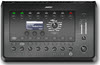
Engineered with a powerful DSP engine and intuitive user control, the T4S/T8S ToneMatch mixers offer studio-quality EQ, dynamics and effects. Sound great with integrated BoseToneMatch processing and zEQ, especially when connected to a Bose L1 or F1 system for full end-to-end tonal control.
read more — T4S/T8S ToneMatch® Mixers